TL;DR: For most homes, a 50-inch TV looks best with the center of the screen about 42 inches from the floor, which usually places the bottom edge around 29–30 inches high. The exact height depends on where you sit, but mounting into wall studs and using the correct bracket are just as important as choosing the right viewing height.

In this guide:
If you’re mounting a 50-inch TV, getting the height right is only part of the job. You’ll also need to find the studs, secure the bracket properly, and figure out what to do with those hanging cables. For most living rooms, placing the center of the screen around eye level is a good starting point, but the right height can change depending on your seating, furniture, and room layout.
In this guide, we’ll walk you through the full process, from choosing the best viewing height to mounting the TV safely and hiding the cords for a clean, finished look.
Is a 50-inch TV right for your space?
A 50-inch TV is a great fit for most bedrooms, apartments, and medium-sized living rooms as it offers a big, immersive picture without overwhelming the space.
One thing people often forget: TV sizes are measured diagonally, not across the width. So, a 50-inch TV isn’t actually 50 inches wide. Most 50-inch TVs are approximately:
- 43–44 inches wide
- 24–25 inches tall
- 50 inches diagonally
For the best viewing experience, sit about 6 to 8 feet from the screen. Sitting closer feels more immersive, while sitting too far away can make small details harder to see.
✨ You might like reading: How High Should a 65-Inch TV Be Mounted?
How high should a 50-inch TV be mounted?
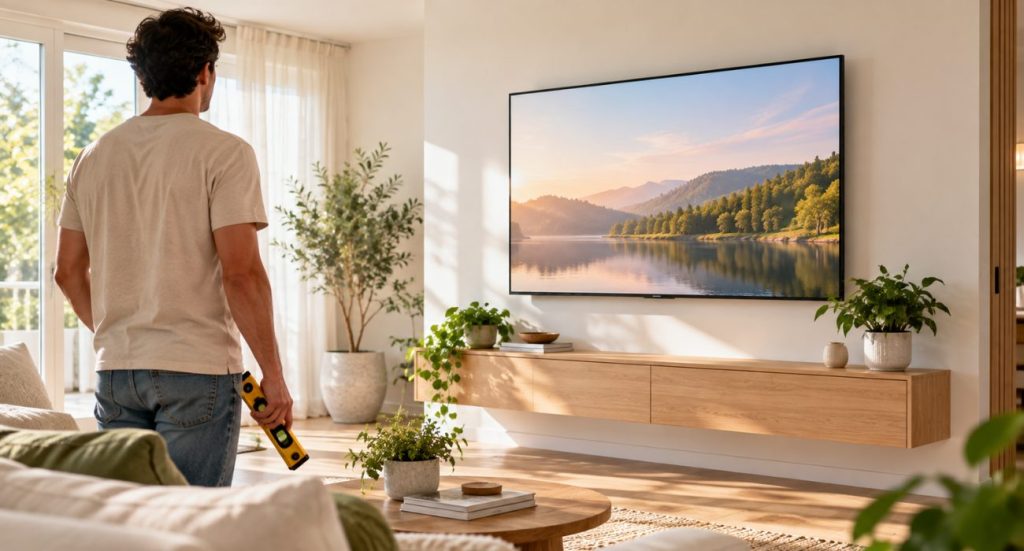
 A good rule of thumb is to mount your TV so the center of the screen sits roughly 42 inches from the floor, which usually puts the bottom edge around 29 to 30 inches high. That said, don’t stress too much about hitting an exact number. The real goal here is simply to keep the center of the screen close to your natural eye level when you’re hanging out in your favorite spot. If you’re off by an inch or two, you honestly won’t even notice once the movie starts.
If you’d rather be a little more precise, you can use a simple formula:
Seated eye level – Half the TV’s height = Bottom of the TV.
For example, if your eye level sits at 42 inches and your TV is 25 inches tall, the bottom edge should be about 29.5 inches from the floor. Again, a tiny difference won’t ruin your night, so as long as the center is close to eye level, your neck will thank you.
What about bedrooms and fireplaces?
Some rooms require a slightly different setup.
- Bedrooms: Since you’re usually lying down or leaning against pillows, the TV is often mounted a little higher. A tilting mount can improve the viewing angle.
- Fireplaces: TVs installed above fireplaces typically sit higher than recommended. Make sure there’s enough distance from the heat, and consider a tilting or full-motion mount to angle the screen toward your seating area.
🪵 Read our full breakdown of mounting a TV above a fireplace
Before you start mounting your TV
Once you’ve decided where the TV should go, it can be tempting to grab the drill and get started. But spending just a few extra minutes checking your wall, bracket, and hardware now can save you from making unnecessary holes or having to remount everything later. Before you begin, make sure you’ve covered these basics:
🧱 Check the wall type
Most homes in the US have drywall installed over wood or metal studs. Drywall may look solid, but it should not be treated as the main support for a 50-inch TV unless the mount and anchors are specifically rated for that installation.
Whenever possible, secure the wall bracket directly to the studs behind the drywall. Studs are commonly spaced 16 inches apart, although some homes use 24-inch spacing.
Concrete and brick walls require different drill bits and anchors, so follow the instructions provided with your wall mount.
🤔 Keep reading: Does Mounting a TV Damage the Wall? Pros and Cons Explained
📺 Confirm the VESA pattern
The VESA pattern refers to the spacing between the mounting holes on the back of the TV. Check your TV manual or measure the holes to confirm that your bracket supports the correct pattern.
The mount should also be rated for both the size and weight of your TV. Screen size alone does not tell you whether a bracket is strong enough.
🛠 Gather your tools
Depending on your wall and mount, you may need:
- Stud finder
- Tape measure
- Pencil
- Bubble level
- Drill and appropriate drill bits
- Socket wrench or screwdriver
- Mounting hardware
- Soft blanket or towel
- A second person to help lift the TV
Note: Read the instructions included with both the TV and wall mount before drilling. Hardware sizes and installation steps can vary between manufacturers.
How to mount a 50-inch TV

At this point you’ve already picked the height, confirmed your bracket fits, and checked the wall. Now you just have to follow these steps to mount it safely:
📐 1. Find the right viewing height
Sit where you normally watch TV and measure your seated eye level. Use that measurement to determine where the center of the screen should land.
Next, measure the distance between the center of the TV and the mounting hooks or brackets on the back. This will help you place the wall bracket accurately instead of relying on the TV’s outer dimensions alone.
🖼️ 2. Locate the studs
Run a stud finder across the section of the wall where the bracket will go. Mark the center of each stud with a pencil.
If your stud finder gives inconsistent readings, don’t panic. That happens sometimes, especially around wiring or plumbing. Just rescan the area slowly and follow the manufacturer’s instructions before drilling.
🧍↕ 3. Position and level the bracket
Hold the wall bracket against the studs at your chosen height. Place a level on top and adjust the bracket until it is straight.
Mark each drilling point through the bracket holes. Step back and check the height and position one more time before making any holes.
🛠️ 4. Drill the pilot holes
Remove the bracket and drill pilot holes into the marked stud locations. Use the drill bit size recommended in the wall mount instructions.
The pilot holes should be slightly smaller than the lag bolts so the hardware can grip the wood securely.
⚙️ 5. Secure the wall bracket
Place the bracket back on the wall and insert the lag bolts through the mounting holes. Tighten them firmly into the studs using a socket wrench.
Avoid overtightening, since too much force can damage the wall, bracket, or hardware. Check the level again before moving on.
✨ 6. Attach the mounting brackets to the TV
Lay the TV face-down on a clean, soft blanket or padded surface. Do not place it directly on a hard floor or press against the screen.
Line up the mounting arms with the VESA holes on the back of the TV and secure them using the correct screws and spacers. Follow the mount instructions carefully, as using screws that are too long can damage the TV.
🤝🏻 7. Hang and secure the TV
Ask another person to help you lift the TV. A 50-inch screen may not feel extremely heavy, but its size makes it awkward and easy to drop or twist.
Lift the TV onto the wall bracket, confirm that both sides are properly connected, and engage any locking screws, straps, or safety tabs included with the mount.
Once it is secured, check that the TV is level and gently test that it does not shift away from the wall.
How to hide TV cables
Visible cords can make an otherwise clean installation look unfinished. So, if you want the setup to look neat and uncluttered, there are ways to organize them without leaving a bundle hanging below the screen.
➰ Use an in-wall cable management kit
An in-wall cable management kit creates the cleanest appearance by routing cables through the wall cavity. One opening is placed behind the TV, while another sits lower on the wall near the outlet and connected devices.
However, regular TV power cords should not be run loose through the wall. Use a listed in-wall power and cable management kit designed for this purpose, and follow all local electrical requirements.
If you are unsure what is permitted or you need a new electrical outlet installed behind the TV, contact a qualified electrician.
💡 Install a paintable cable raceway
A surface-mounted cable raceway is a simpler option for apartments, rentals, or walls you do not want to open.
The raceway attaches directly to the wall and holds the cords inside a narrow channel. Many models can be cut to size and painted to match the wall, helping the cover blend into the room.
⭐ Keep cords organized behind furniture
If the outlet sits close to a media console, cord clips, cable sleeves, or hook-and-loop ties can keep everything together as it runs down the wall.
Avoid tightly bending cables or bundling power cords in a way that creates excess heat.
Common mistakes when mounting a 50-inch TV
 Even a small installation mistake can affect the way the finished setup looks or feels.
📏 Mounting the TV too high
A TV can look perfectly positioned while you’re standing but feel uncomfortable once you sit down. Always check the height from your normal viewing position before drilling.
📐 Measuring from the bottom of the TV
The wall bracket does not usually attach at the exact center or bottom of the screen. Measure the location of the mounting hooks on the back of the TV so the final height matches your plan.
🛋️ Forgetting nearby furniture
This is one of those mistakes people don’t realize until it’s too late. Maybe the soundbar blocks the bottom of the TV, or the media console ends up sitting much closer than expected. Before drilling, make sure there’s enough clearance for everything that will go under or around the screen, not just the TV itself.
⚠️ Skipping the level
It is difficult to judge a straight line by eye, especially on textured walls or near uneven ceilings. Use a level when marking the bracket and check it again after tightening the bolts.
👦🏻 Lifting the TV alone
Even when the TV’s weight seems manageable, its width makes it difficult for one person to control safely. A second person can help prevent damage to the screen, wall, and mounting hardware.
Final thoughts
Mounting a TV can completely change the look of a room, but getting everything just right takes more work than many people expect. Finding the studs, leveling the bracket, avoiding pipes or electrical wiring, and keeping the cables neatly hidden all take time, especially if it’s your first installation.
If you’d rather skip the trial and error, Geeks on Site can take care of the entire installation, from securely mounting the TV to helping you achieve a clean, finished look.
You might like: How High Should a 85-Inch TV Be Mounted?
FAQs
Can I hang a 50-inch TV myself?
Yes, many homeowners can mount a 50-inch TV themselves if they have the right tools, can locate the wall studs, and have someone to help lift the TV. However, if you’re mounting above a fireplace, working with brick or concrete walls, or want to hide cables inside the wall, hiring a professional is usually the safer option.
What size bracket do I need for a 50-inch TV?
The bracket size depends on your TV’s VESA mounting pattern and weight, not just the screen size. Most universal TV mounts list the VESA patterns they support, so always check your TV’s specifications before buying a bracket.
Will toggle bolts hold a TV in drywall?
It depends on the TV, the mount, and the hardware. While some heavy-duty toggle bolts are designed for certain TV installations, many manufacturers recommend securing a 50-inch TV directly to wall studs whenever possible. Always follow both the wall mount and anchor manufacturer’s weight ratings.
Is it better to mount a TV higher or lower?
If you have to choose, it’s generally better for the TV to be slightly lower than too high. Looking upward for long periods is more likely to cause neck discomfort than looking slightly downward.
How long does it take to mount a 50-inch TV?
For an easy installation on a drywall wall with accessible studs, most DIY projects take between one and two hours. More complex installations, such as mounting over a fireplace or hiding cables inside the wall, can take longer.
Last Updated on July 24, 2026